100/100 on PageSpeed, after one morning of work. Mobile performance went from 60 to 100. We moved help.collabim.cz, the Czech help center of the SEO tool Collabim, from its old system to Notion and Super: 125 pages, about 450 images and a new navigation with search. The work was done by an AI agent (Claude Opus 5.5 in Claude Code, with the Notion API, the Notion MCP and the Super MCP), while a person from our team made the decisions. Want the same for your site? See our Custom website build.
The site we started with
Collabim is a Czech SEO tool for rank tracking, link building and AI visibility. Its help center, help.collabim.cz, had grown over the years into 146 URLs: 6 categories, more than 130 articles nested up to 5 levels deep, an FAQ with 34 questions and a long changelog.
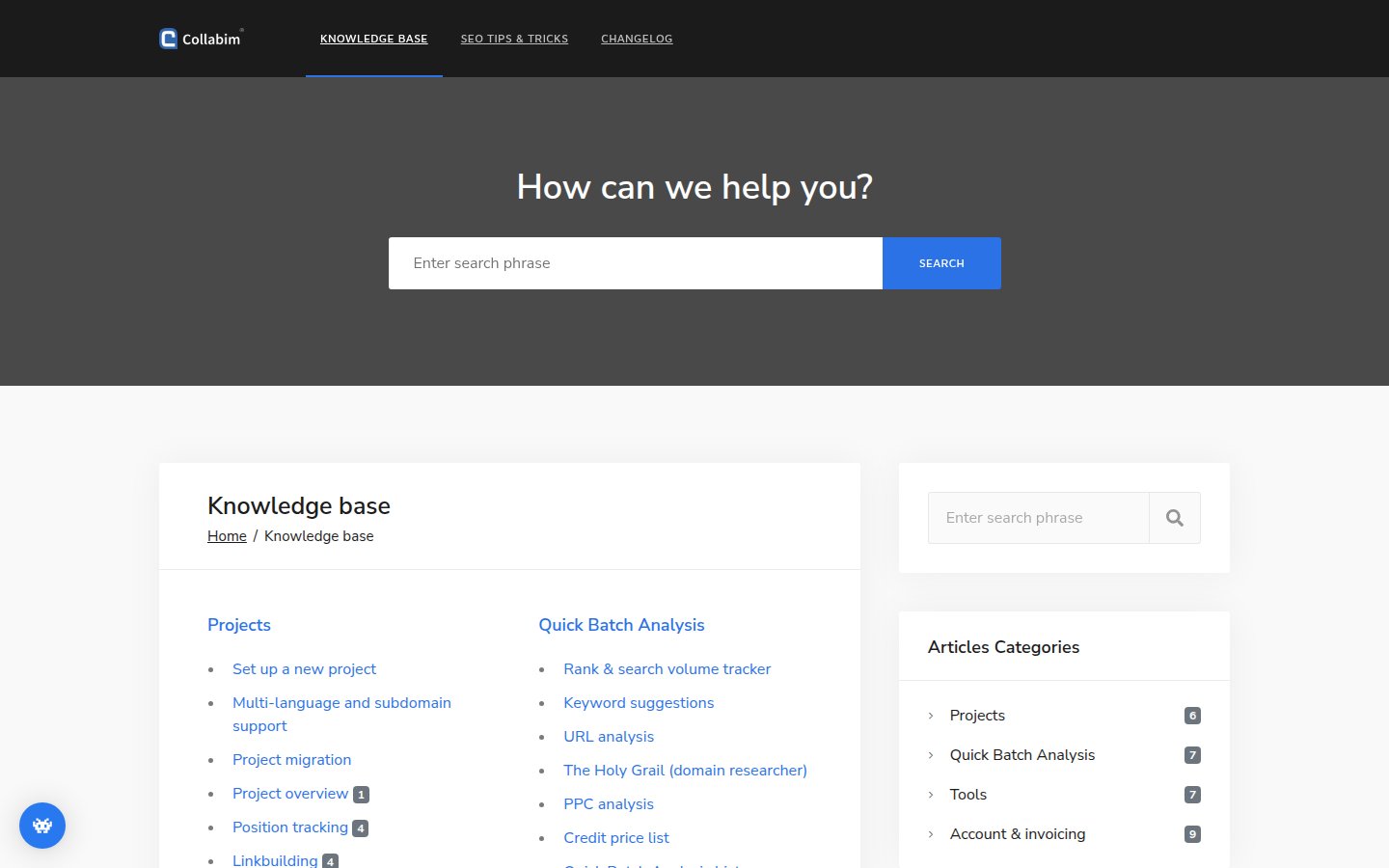
It ran on an older custom system built on jQuery, Bootstrap and Font Awesome. It worked, but the homepage alone downloaded about 1.75 MB in 53 requests, editing an article meant going through the developers, and finding the right guide meant a lot of clicking. The English twin, help.collabim.com, still runs on the same system, so you can compare the two today.
The result: PageSpeed 60 → 100
We ran Google PageSpeed Insights on both homepages on 15 November 2026. The old Czech site is gone, so the old score comes from its English twin, which runs on the same system and template.
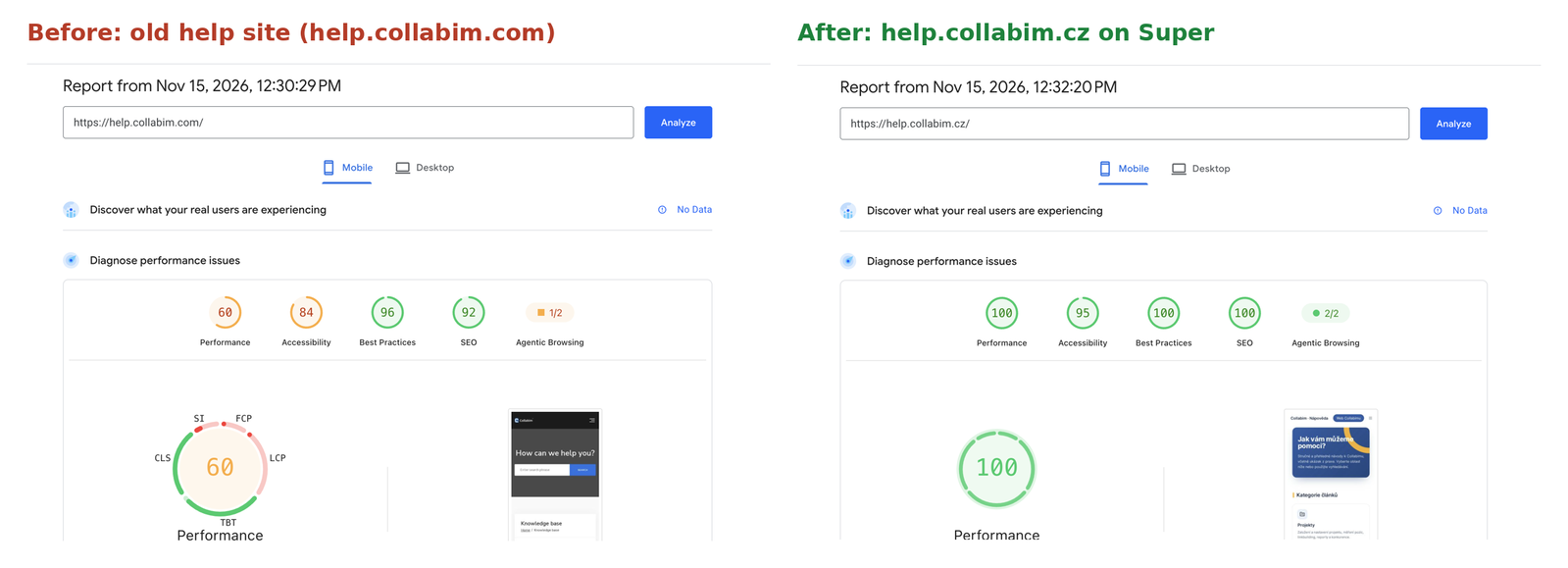
PageSpeed Insights, mobile | Old system | Super |
Performance | 60 | 100 |
Accessibility | 84 | 95 |
Best Practices | 96 | 100 |
SEO | 92 | 100 |
Agentic Browsing | 1/2 | 2/2 |
A Lighthouse run on our side (simulated mobile) shows where the difference comes from:
Homepage | Old system | Super |
Largest Contentful Paint | 3.7 s | 1.4 s |
Total Blocking Time | 810 ms | 0 ms |
Page weight | 1.75 MB | 0.46 MB |
Requests | 53 | 25 |
No one tuned the new site for speed. This is what Super serves out of the box: static pages on a global CDN, optimized images and no heavy JavaScript framework.
How the morning went
Before 9:25: the plan
The migration started in a chat with Claude, not in code. The chat produced a plan, saved in Notion: take an inventory of all 146 URLs from the sitemap, rebuild the page tree in Notion so it follows the URL structure, upload images straight to Notion so nothing depends on the old server, turn internal links into links between Notion pages and keep a URL map in Notion with a status for every page. Once the plan was ready, the work moved to the terminal, where the agent could load pages much faster.
9:25: scraping the old site
The agent read the sitemap, downloaded the HTML of every page and converted it to Markdown. That took about 5 minutes.
9:34: into Notion, the slow way
The first attempt used the Notion MCP. The agent split the URL map into 6 parts and started 6 sub-agents in parallel. After a few minutes only 7 of 145 pages were done: all six agents shared one rate limit, and every image was a separate call. With about 450 images, that would have taken hours.
9:51: into Notion, the fast way
We created an internal Notion integration and gave the agent its token. It wrote a small loader for the Notion API that creates the pages in the right order, imports the images and rewrites internal links. At 10:12 all 125 pages were in Notion, the site was synced to Super, and all 139 URLs in Super's sitemap returned 200. A check of 10 random pages against the old site found no missing text and no broken images.
10:13 to 11:50: navigation and design
The rest of the morning went into making the help center easier to use, one short prompt at a time.
Better navigation, search and orientation
The old help center had a search box and a list of categories. The new one is built so readers always know where they are and where to go next.
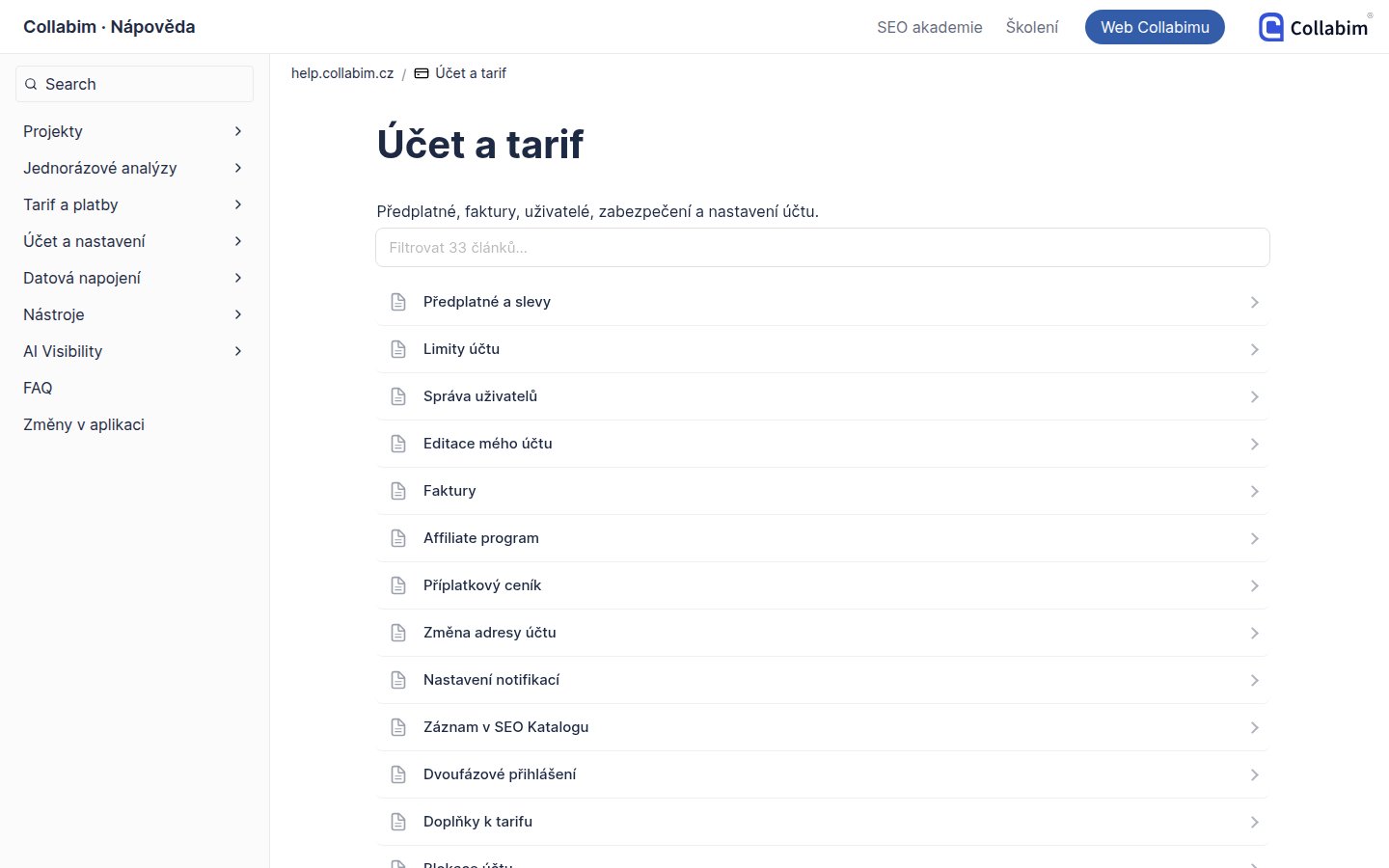
- Left menu with search. Every category is a collapsible group with its articles, and the group of the current page opens by itself. Search sits at the top of the menu. One category had 33 articles, more than a menu group holds (30), so it became two groups: Plan & billing and Account & settings.
- Filterable article lists. Category pages list their articles in the style of docs.super.so, one row per article with an arrow, and a “Filter 33 articles…” box above the list.
- Linked homepage cards. Each category card on the homepage links to its key articles and ends with “All N articles →”.
- Breadcrumbs and a compact header. A small icon next to the title replaces the large Notion page icon, so the content starts at the top of the screen.
- Table of contents that floats next to long articles.
- Reading progress bar. A thin bar at the top of the page, in Collabim's blue and yellow, fills up as you scroll. We turned it into a free snippet that any Super site can use: Reading Progress Bar.
- FAQ as toggles. 34 questions became one compact list of toggles instead of a long wall of text.
Design: three options, one pick
For the article design, the agent first built three clickable previews of one real article, AI Visibility, with the real text. It then tried the style on three random pages and reported where it helped and where it did not. A short guide gains little from a big header, and a page that mostly lists other articles needs its list, not a hidden one.
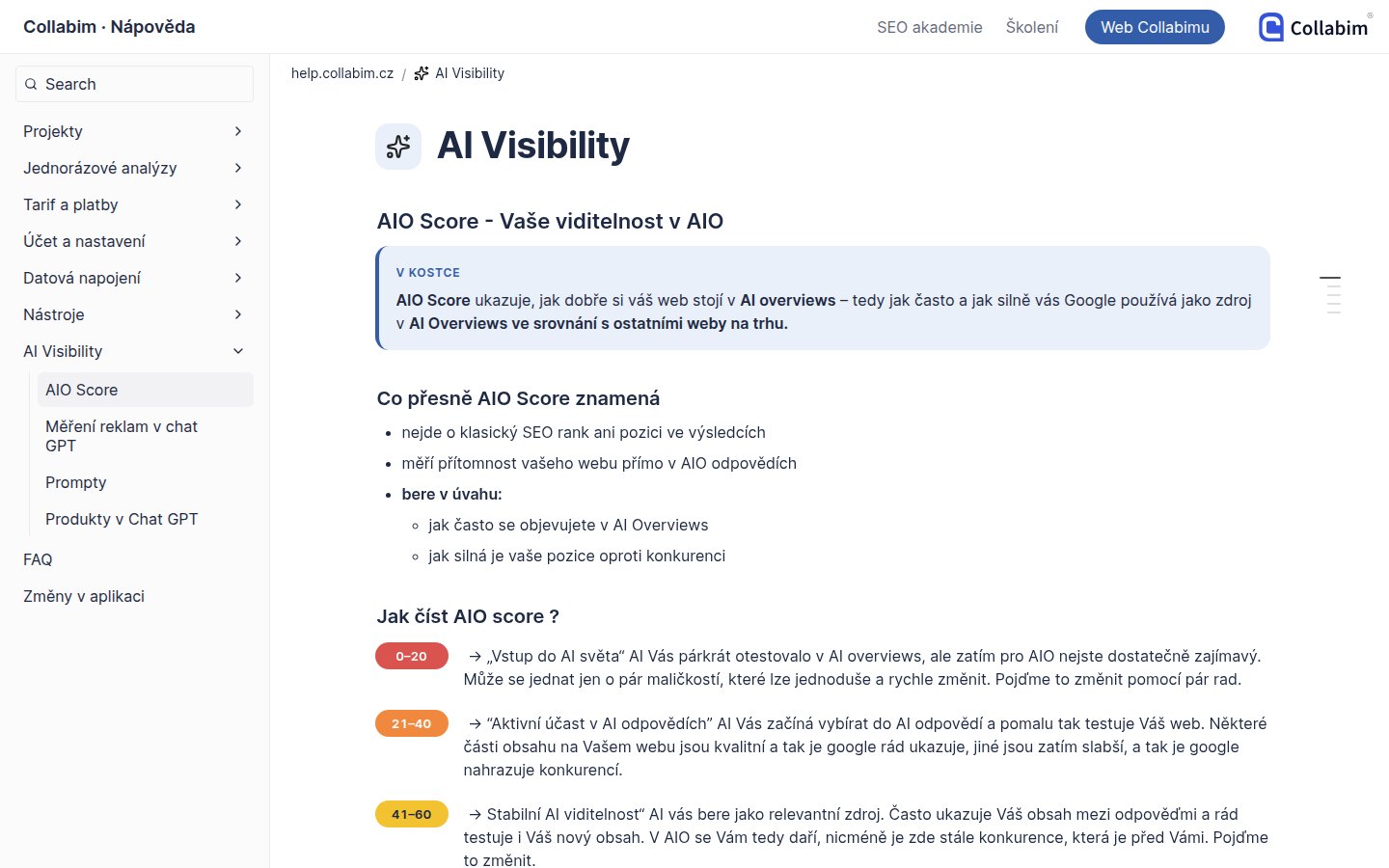
We picked the third option, a clean guide: an “In short” box with the main point at the top, colored labels for the score bands and a yellow box for warnings. The warning banners of the old site were lost when the HTML was converted, so the agent rebuilt them as yellow callouts. The content still lives in Notion as ordinary blocks, and the Collabim team edits it there.
What is not perfect yet
One morning bought a fast, working help center, not a finished one. The new design still has gaps, and we want to be honest about them:
- The new article style is live on a few pilot pages. Most of the 125 articles still use the clean default look and do not have the “In short” box or the styled score labels yet.
- Some pages carry small conversion errors. Merged paragraphs, a stray asterisk or a missing warning box, fixed so far only on the pages we checked by hand.
- Articles share one generic icon. Matching icons for each article would make the lists and the menu easier to scan.
- A few old addresses still need redirects, and three large videos and five downloads still need a new home—outside Notion or on a paid Notion plan, whichever works better.
- The English help center is the second wave.
Each of these is a few more prompts or an afternoon of work. Whether it is worth that time is the client's call: the site already loads in a fraction of the time, the content is complete and the team edits it in Notion. We list the gaps, estimate them and let the client decide what to polish next.
What we learned
- Plan in Notion first. A URL map with a status per page kept the work on track and showed what was left at any moment.
- Use the Notion API for bulk imports. The Notion MCP is great for editing pages one by one. For hundreds of pages and images, a small loader with your own integration is many times faster.
- HTML to Markdown loses details. Line breaks inside paragraphs, bold around images and styled warning boxes do not survive a plain conversion. Check the source HTML of pages that look off.
- Mind the file limit. Free Notion workspaces accept files up to 5 MB each, so big videos and downloads will need another home. Paid plans raise that to 5 GB per file—plenty of room, unless your help center moonlights as a film studio.
The numbers
What | How much |
AI model and tools | Claude Opus 5.5 in Claude Code, with the Notion API, the Notion MCP and the Super MCP; the plan was drafted in a chat with Claude |
URLs in the old sitemap | 146 |
Pages moved to Notion | 125 |
Images moved to Notion | About 450 |
Content import through the Notion API | About 20 minutes |
From the first prompt in the terminal to the new site with navigation and design | About 2.5 hours (9:25 to 11:50) |
Prompts in the terminal | About 30, most of them one sentence |
PageSpeed Insights, mobile performance | 60 → 100 |
Want your site moved like this?
We do this as a service. With a Custom website build, our team moves your existing website, help center or documentation into Notion, designs it to match your brand, connects your domain and sets up SEO. You get a fast site that you edit in Notion from day one. Builds start at $250 and you get a fixed offer before we start.